
The Complete Guide to Google Ads Ad Extensions
Get to know every Google Ads ad asset (formerly extensions), what each one does, and how to use them to improve your results.


There are many different kinds of ad extensions, but keep reading and we will show you all of them
First of all, an update: since 2022, Google Ads has been calling extensions ad assets. The name changed, not the function. We kept “extensions” in the title because that is still how everyone searches for them, but in the dashboard you will find them under the “Assets” tab.
Each Google Ads asset has a specific role. In general, though, you can say they exist to convey additional information and capture more attention.
We recommend exploring every asset that applies to your case. That way, your ads gain quality and you pay less per click, as we explained in our article on Quality Score.
Below, we put together a list of ad assets with definitions and examples so you can get the most out of each one!
- 1 - Sitelinks
- 2 - Callouts
- 3 - Structured Snippets
- 4 - Call Extension
- 5 - Lead Form
- 6 - Message Extension (discontinued)
- 7 - Location Extension
- 8 - Affiliate Location Extension
- 9 - Price Extensions
- 10 - App
- 11 - Promotion
- 12 - Seller Ratings
1 - Sitelinks
These are links shown right below the description of the top search results.
This asset lets the advertiser offer users several destination options within their site. It is one of the most important on the entire list.
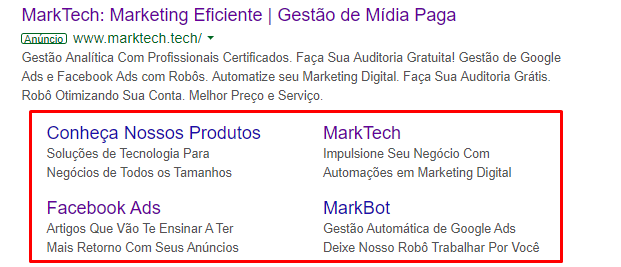
You can include a separate link to a contact page, for example, or to a product category you want to highlight.
We have a whole guide with tips for creating better sitelinks. It is worth reading before setting up yours.
2 - Callouts
Add extra information about your terms or use selling points.

Common examples include phrases like “Free Shipping”, “Purchase Protection”, “Pay in 12 Installments”.
Want the step-by-step for creating them? Check out our callout guide.
3 - Structured Snippets

This is another way to highlight important aspects of your product or service.
This time, however, the information must fit specific headers, such as “Services”, “Types”, or “Models”, among others.
Follow a few best practices: include more than four values in each header, be objective and, if possible, use more than one header.
4 - Call Extension
If one of your goals is getting more phone calls, then you need to set up a call asset.
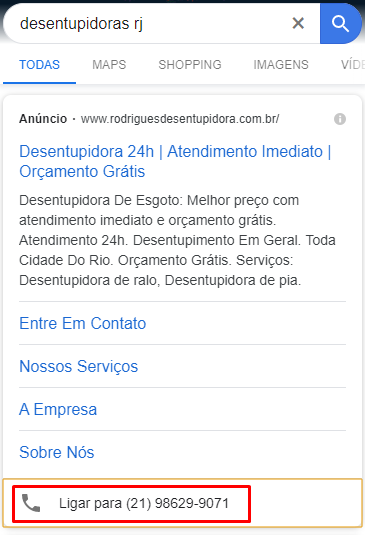
With it, your ad shows as usual, plus a phone number to get in touch. If the search happens on a mobile phone, the number is clickable.
It became even more important with call-only ads on their way out: the path now is the responsive search ad with the call asset attached.
5 - Lead Form
This asset lets you capture a user's contact information before they even reach your site. Today, it is available in Search and Performance Max campaigns.
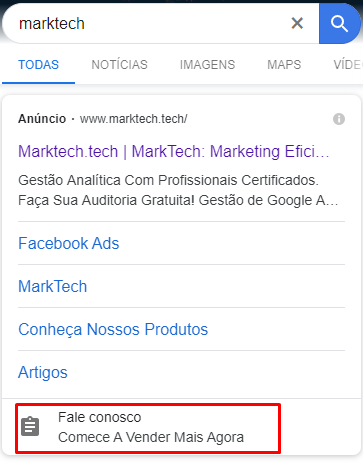
When the asset is clicked, a short form loads where users can share information such as name, email, and phone number.
If you want to learn more, we have an article explaining every detail of the lead form.
6 - Message Extension (discontinued)
This one was quite similar to the call extension, but it led to an SMS conversation instead of starting a phone call.
Google discontinued the format in 2020. We keep it on record here because people still search for it. But if the idea is to capture the user's contact info without relying on your site, the current path is the lead form, right above.
7 - Location Extension
Applicable only to businesses with a physical address where they serve customers.
If you have more than one store, for example, Google will show the address closest to the person searching.
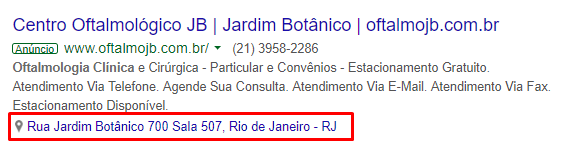
Setup requires a verified Google Business Profile account (formerly Google My Business) linked to Google Ads. After that, just turn the asset on and it will start showing.
If users click directly on the address, they are taken to Google Maps instead of your site. On Maps, your address will already be highlighted and they can pick the best route to reach you.
8 - Affiliate Location Extension
If your products can be found in retail chain stores, then you can use affiliate locations.
Google maintains a list of major retail chains already registered as affiliates in Brazil.
During setup, you just select which of them carry your products and you are done.
9 - Price Extensions
With this type, you can show price ranges for specific products or categories right in the ad. Also, when someone clicks a price extension, traffic can be sent to those products' specific pages.
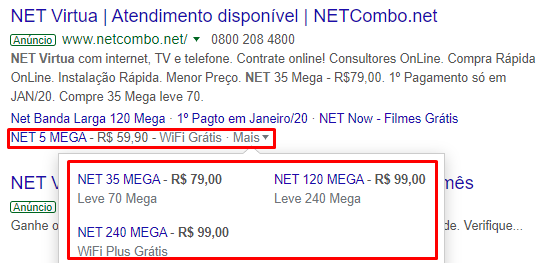
This creates shortcuts to conversion and improves user qualification, since visitors arrive at the site already better informed.
10 - App
If your company has an app available for download, then you can show that option with your ad. Users can choose to click your headline to go to the site or click the extension to download the app.
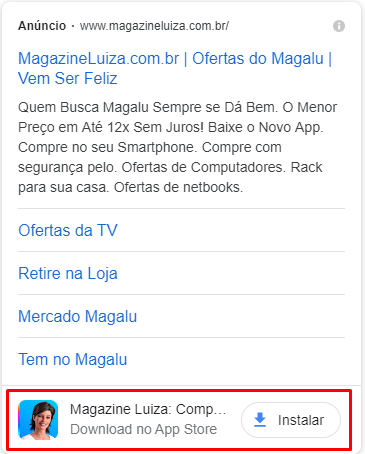
And the best part?
There is no extra cost: you pay only for the click, as with every other asset.
11 - Promotion
If you run limited-time offers, this asset needs to be part of your account. With it, you set the duration, the absolute or percentage discount, and which products are included.
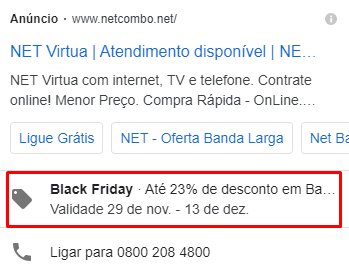
You can also select special occasions, such as Christmas or Black Friday. In those cases, a tag is added, capturing even more attention.
12 - Seller Ratings
Setting up this asset is a bit more complex and may require a developer's help. Still, it deserves a mention because it is extremely powerful, especially for e-commerce.
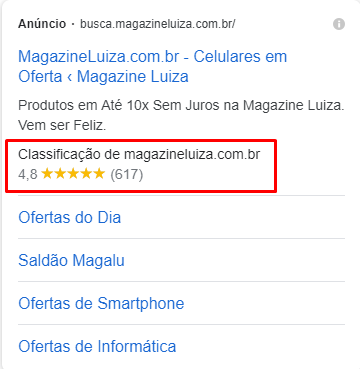
Through the Google Customer Reviews program, ratings can be collected every time someone buys from your store.
If buyers agree to share their opinion, they receive a survey by email a few days after their product arrives.
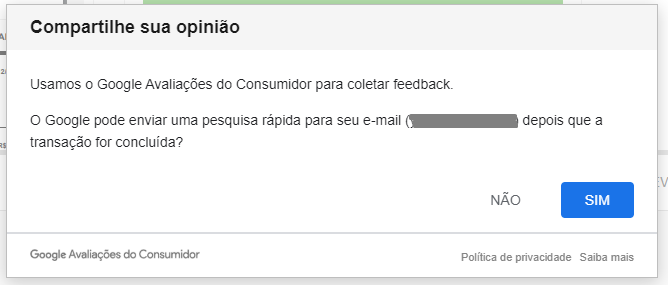
Once a minimum number of reviews is recorded, your store receives a rating from 1 to 5. That rating is then displayed with your ads and can lift your click-through rates.
Once you have picked the types, it is time to decide where each asset goes: at the account, campaign, or ad group level. We explain how to combine assets most efficiently in another article.
Want to improve your Google Ads account performance with marketing technology? Try Marktech's tools by clicking the button below.
Want these results in your campaigns?
Talk to a Marktech consultant and get a free diagnosis of your media operation.
Talk to a consultant

