
Google Ads Lead Form Extension
Meet the Google Ads lead form asset (the former lead form extension), which shortens the path between the click and the contact you receive.


- What is this asset?
- First of all, what does this asset offer?
- How do I create a lead form?
- Step #1
- Step #2
- Step #3
- Step #4
- Step #5
- Downloading your leads
What is this asset?
Almost a year after announcing it, Google Ads rolled this feature out to its users. Since then, it has left beta and become a staple of lead generation campaigns.
It is an ad asset (the former ad extensions, renamed by Google in 2022) that cuts down the number of steps between the first interaction and the contact you receive.
Now, when a potential customer searches for your products or services, they no longer need to visit your website to leave contact information such as email and phone number.
Instead, the click opens a form where they can share the requested details.
Want to learn how to set up this asset? Then check out the step-by-step guide we prepared for you!
First of all, what does this asset offer?
We have said this a few times before, but it is always worth repeating how decisive user experience is for anyone building a digital strategy. And it seems Google took this point quite seriously when creating the lead form.
The logic is simple: if someone is already willing to leave their information in order to be contacted and learn more about what you offer, then you need to give them that option!
Someone searching on Google who wants to share their email with the advertiser, for example, will be able to do it much faster.
There is no more waiting for the landing page to load, looking for the contact section, going to another page with the form, filling everything out and, finally, completing the sign-up.
As a result, we can expect a higher conversion rate from ads focused on lead generation.
How do I create a lead form?
Step #1
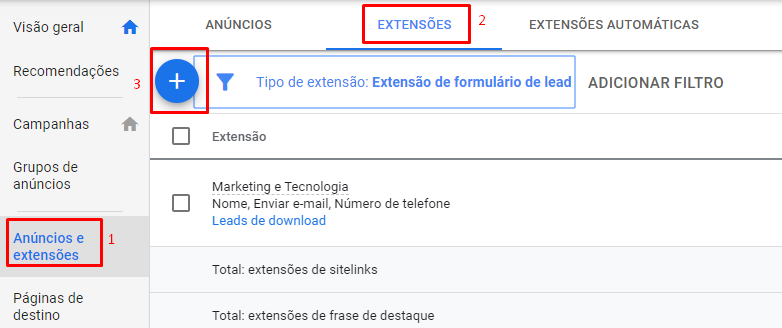
Log in to Google Ads and open the account you want. There, go to the “Campaigns” section (left-hand menu), then click “Assets” and, finally, click the blue “+” button.
The screenshots below are from the interface at the time; the menus have been renamed, but the form fields remain pretty much the same.
Step #2
Among the available options, look for “Lead form”. Next, select the campaigns you want to attach the form to (we have already shown how to apply assets more efficiently).
Step #3
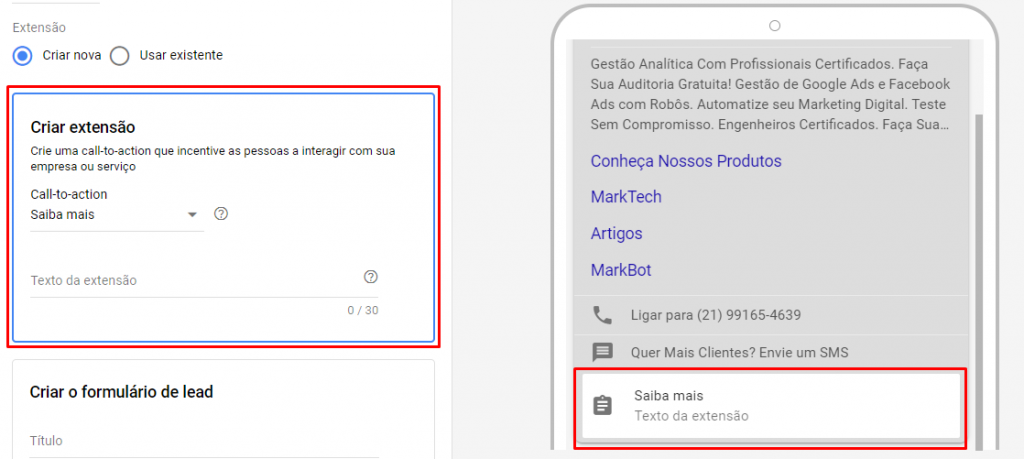
Choose the call-to-action button type that best fits your goal. You will also need to add a short text of up to 30 characters, which will appear right below the button.
Step #4
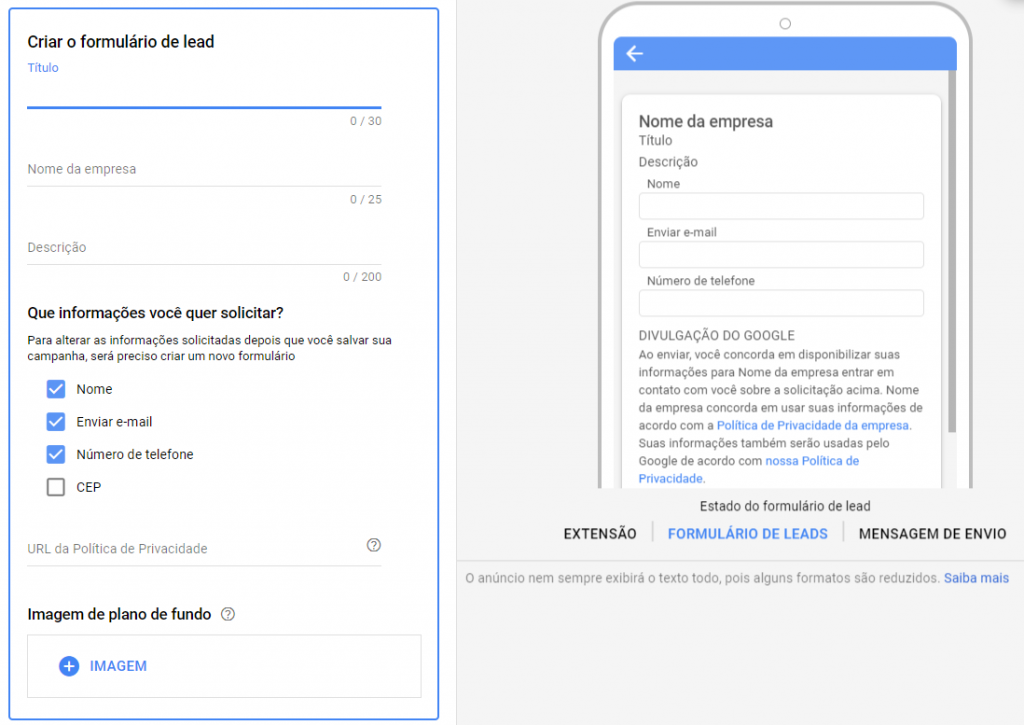
Now we need to set up the form that opens after the click. You will need to identify your business, give the form a headline, and describe why people should fill it out.
Remember to use persuasive copy here. Next, select which information you want to collect. Here at Marktech, we ask only for name, email, and phone number.
Finally, paste the URL that takes people to your company's Privacy Policy and select a background image.
The recommended size is 1,200 x 628 (a 1.91:1 aspect ratio).
Step #5
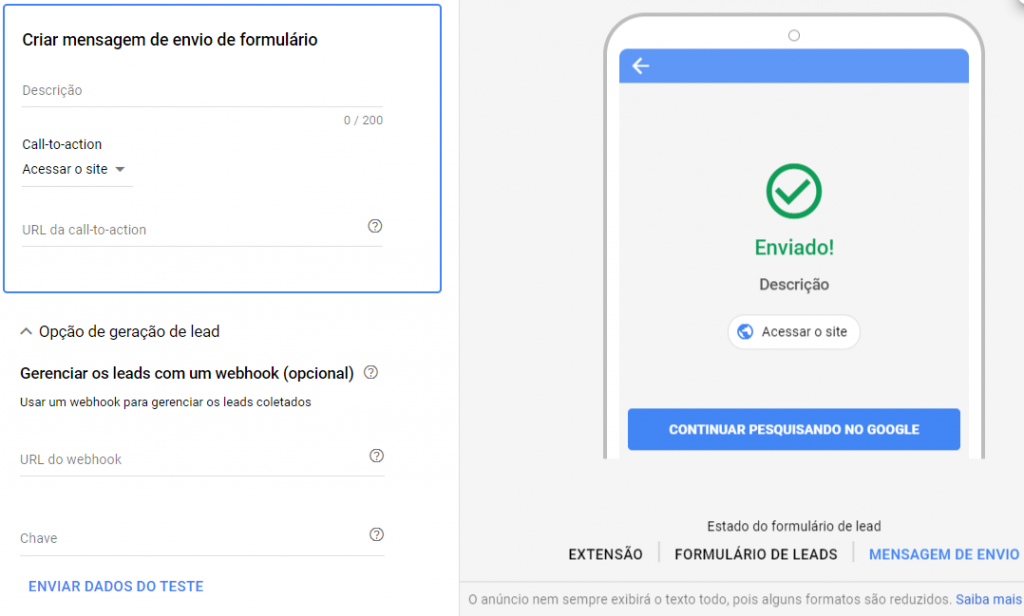
We are almost there! All that is left is to create a thank-you message for those who submit your form.
At this point, there will also be a button you can use to send the user to a relevant page.
Today the asset is available to advertisers in general: you can use the lead form in Search and Performance Max campaigns (on Display, there are extra spend and verification requirements). Now that you know how to create it, go to Google Ads and try it in your account!
Downloading your leads
The process is quite simple:
In the assets report, look for the row that corresponds to your lead form.
Right below its name, there is a small download button, as you can see in the first image of this article.
Mind the time window: the download only includes leads from the last 30 days.
You can also export these contacts automatically, via webhook or a CRM integration, to make things faster and easier for your sales team. However, this usually requires technical support from a developer experienced with marketing tools.
Want these results in your campaigns?
Talk to a Marktech consultant and get a free diagnosis of your media operation.
Talk to a consultant

