
Google Ads Ad Relevance: What It Is and How to Improve
Ad relevance is one of the three components of the Google Ads Quality Score. Learn how it is evaluated and get five tips to improve it.


In this article, we will explain everything you need to know to create highly relevant ads.
- What is ad relevance and how does it influence my ads?
- Tip #1: Tell users you have what they are looking for
- Tip #2: Own Your Turf!
- Tip #3: Use as much text as possible in your ad
- Tip #4: Capitalize the first letter of every word in your ad
- Tip #5: Grab more Attention
What is ad relevance and how does it influence my ads?
Ad relevance is one of the three components of Quality Score, alongside expected CTR and landing page experience.
To master this metric, we first need to understand how Google's system “thinks”.
For example, imagine searching for “vegan restaurant” and getting back a “steakhouse” page from Google.
In that case, many people would stop using it, because it would be a search engine with little value.
When it comes to ads, the reasoning stays the same: your ads should reflect as closely as possible the products or services being searched for.
On top of that, you need to present yourself in the most appealing way possible.
By now you must be wondering: how do I do that in practice? That is what we will answer with the tips below!
Tip #1: Tell users you have what they are looking for
Picture the following search: “yellow dress”. For it, the first result displays a link with a big “Yellow Dress on Sale” headline.
The second result, in turn, displays “Women's Fashion on Sale”. The first one certainly carries a message more specific to what you searched for.
And if it was relevant to you, it will also be relevant to Google, which will give this ad a higher relevance score.
So we can sum up the first tip like this:
Include the keyword in your ad headlines.
Today the default Search Network format is the responsive search ad (RSA): you provide several headlines and Google assembles the combinations. So repeat the keyword in more than one headline. To make sure it always shows, pin one of them to position 1.
See our example from a real search:

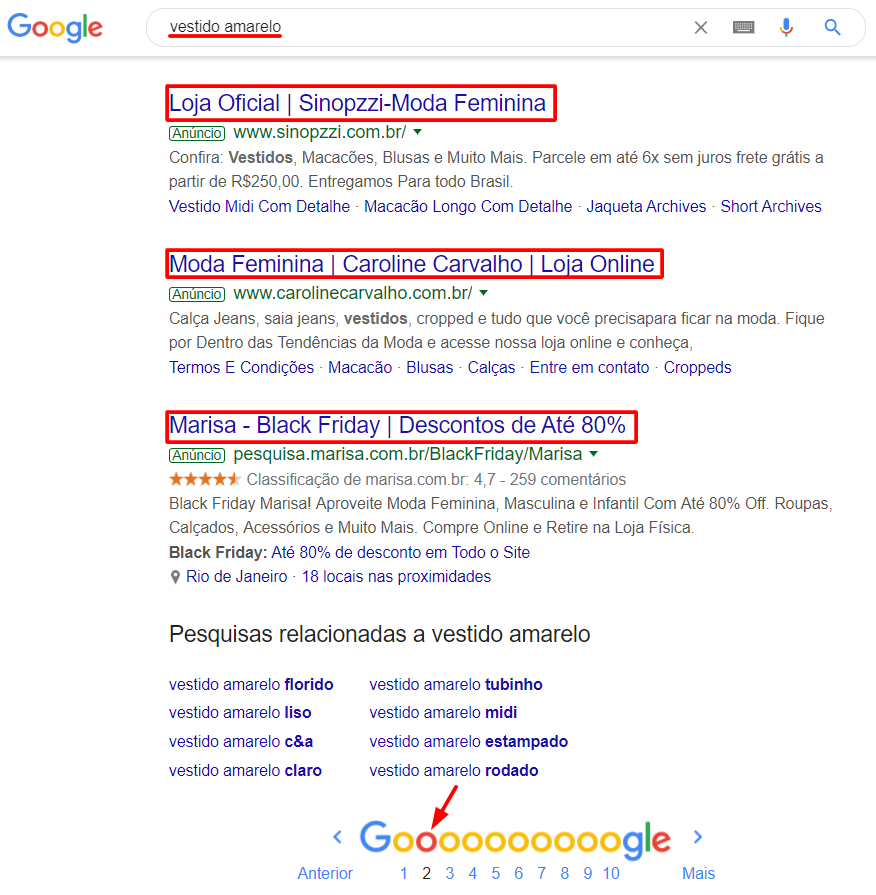
Notice how the ad featuring the keyword in its headline was considered more relevant.
Ad relevance certainly scored points in the Google Ads auction and helped the ad show in the top positions.
On the other hand, see how the ads in the worst positions had little relevance to the search.
Tip #2: Own Your Turf!
In a world as competitive as ours, countless companies fight fiercely over your customers. That is why your business needs to earn its own “space” day after day.
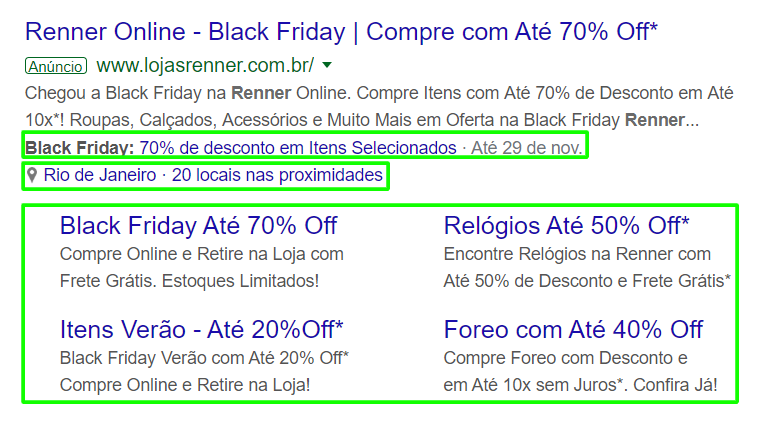
Search Network ads are no different. The more screen space your ad takes up, the more visible and appealing it becomes to the user. That way, you convey more information and increase your chances of getting clicks.
And how do you make your ad take up more screen space? Simple: use every ad asset (the former extensions) that applies to your case. That will make it stand out far more.
Compare the examples below and notice how the first one manages to take up about three times more space:

Tip #3: Use as much text as possible in your ad
As we mentioned, the more information you provide in your ad, the more complete and appealing it looks to the user.
So it pays to fill in every available field, not just the required ones. In an RSA, that means getting close to the 15 headlines and 4 descriptions: the more material, the more combinations Google can test.
Also, try to use as many characters as allowed in each one: 30 per headline and 90 per description.
Once again, compare the examples:


Notice that the second ad showed only 2 of the 3 headlines Google displays at a time. It also showed only 1 of the 2 possible descriptions.
Finally, the “paths” at the end of the display URL were not used.
The first ad, on the other hand, used every possible field, conveying greater authority.
To test headline and description variations before publishing, use the Google Ads ad preview tool, which builds a preview of the search result.
Tip #4: Capitalize the first letter of every word in your ad
This is another good practice to improve your ad relevance. When every word in the ad starts with a capital letter, it stands out more and is easier to scan.
This Paragraph Stands Out More Than The Previous One Because Every Word Starts With A Capital Letter.
See the difference?
Tip #5: Grab more Attention
Another way to make your ad more appealing is adding “Calls to Action” to your headlines (also known as “CTAs”).
These are usually imperative phrases such as: “Get It Now”, “Don't Miss Out”, “Check It Out Today”, “Hurry While Supplies Last”, among others.
It also helps to tell customers about a sale or commercial advantage, such as: “Free Shipping”, “Pay in 10 Interest-Free Installments”, “Free Trial”, etc.
Want these results in your campaigns?
Talk to a Marktech consultant and get a free diagnosis of your media operation.
Talk to a consultant

